
Server Side
Server Side Implementation
Section titled “Server Side Implementation”The server side needs to handle 4 major tasks:
- Generate QR String
- Webhook to receive authorization request
- Change user status
- Verify user status
How it Works
Section titled “How it Works”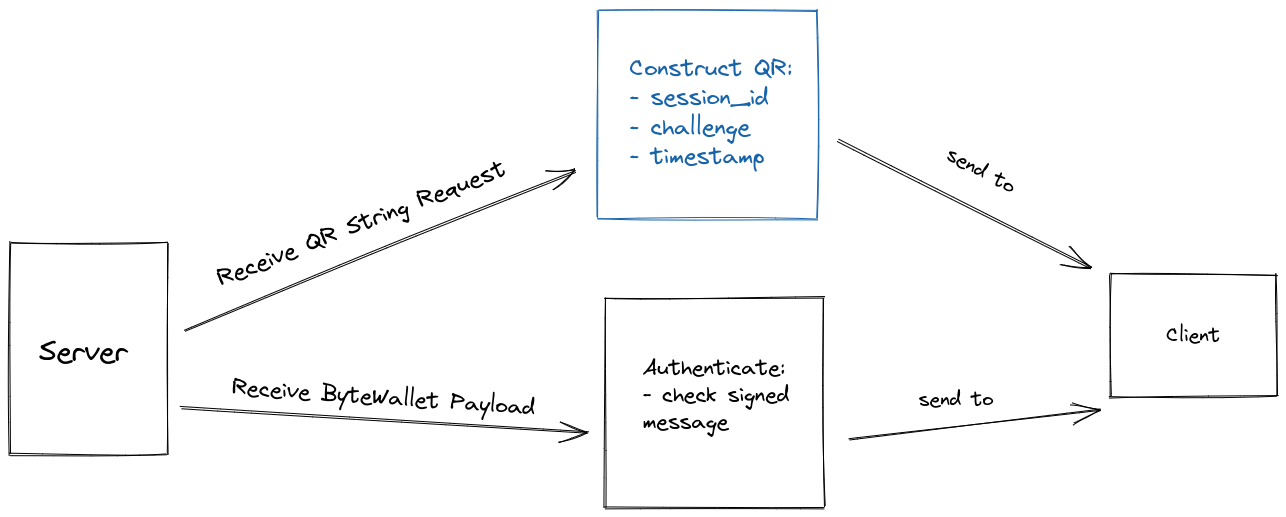
The server generates a QR code that the client presents for the user to scan with ByteVault. Once scanned successfully, the server receives the response at its webhook route.
The response contains a signed version of the QR code (signed by the user’s wallet’s private key). If the signed message corresponds to the public key submitted, the user is authenticated successfully.
Session Table (Optional)
Section titled “Session Table (Optional)”We use this table to store sessions generated when a user loads the login page. The webhook function checks past challenges to ensure the request is recent.
There are many different session systems available, so feel free to use your own.
CREATE TABLE `bf_fast_sessions` ( `id` INT(10) NOT NULL AUTO_INCREMENT, `sid` VARCHAR(150) NULL DEFAULT NULL, `v` TEXT(65535) NULL DEFAULT NULL, `s` VARCHAR(50) NULL DEFAULT NULL, PRIMARY KEY (`id`) USING BTREE, UNIQUE INDEX `sid` (`sid`) USING BTREE)ENGINE=InnoDBAUTO_INCREMENT=1;Dependencies
Section titled “Dependencies”The only server-side dependency is an implementation of Bitcoin ECDSA functions to verify digital signatures.
The following libraries handle the math needed for ECDSA key pair handling:
sudo apt-get install php8.x-gmpsudo apt-get install php8.x-bcmathInstall bitcoin signing package using composer:
composer require bitcoin-php/bitcoin-ecdsause BitcoinPHP\BitcoinECDSA\BitcoinECDSA;npm install bitcoinjs-libnpm install bitcoinjs-messagepip install bitcoinlib1. Generate QR Code
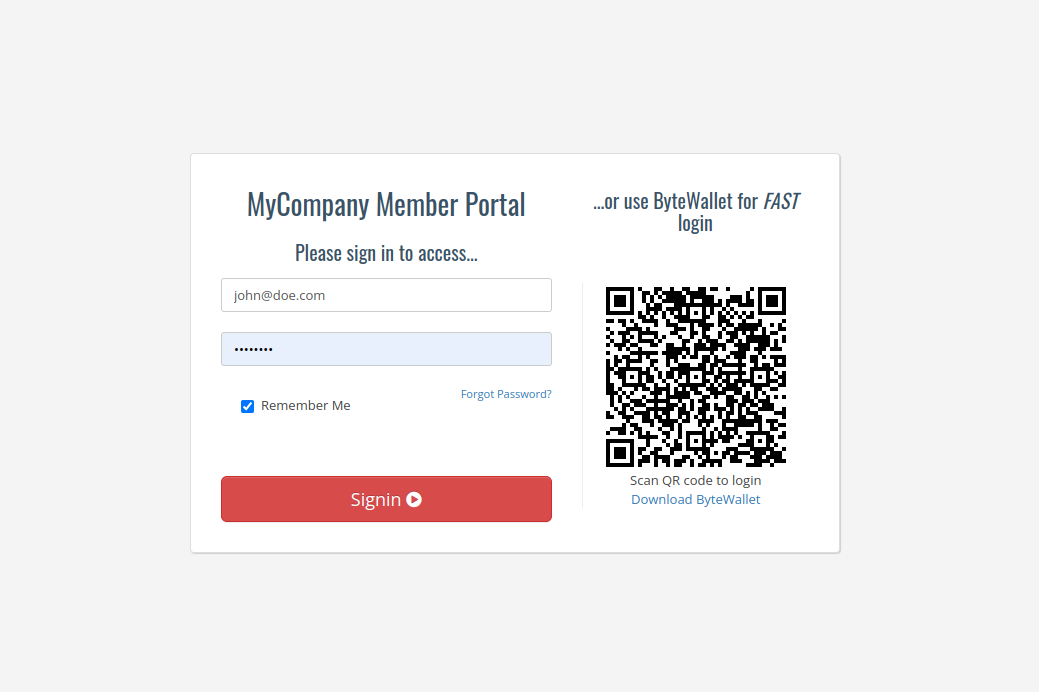
Section titled “1. Generate QR Code”The QR code is the base of the authentication system. It must contain the webhook URL, session_id, challenge, and timestamp.
This QR Code is generated server-side and displayed on the client side - typically on a login page:
Parameters
Section titled “Parameters”Request
Section titled “Request”- session_id:
string- Unique token assigned to user’s session - challenge:
string- Mutual key phrase shared between server and client - timestamp:
string- Hex encoded UTC-timestamp of QR generation
Response
Section titled “Response”{ "qr": "https://my.website.com/api/fastbyte?sid=-ioAzu3w6AJaZ_uu7SnT7HTvJ6ddtFNQ_1660924354&c=xGOxY1TYHK8X0tiDuXl9XPDS3stIZzok_1660924504&t=62ffb258", "sid": "-ioAzu3w6AJaZ_uu7SnT7HTvJ6ddtFNQ_1660924354", "status": 0}Example
Section titled “Example”/** * QR Code generation * * Your login page javascript calls this QR-code-string generating API function * every ~30 seconds to generate a new challenge for your webhook URL. * * GET /api/getqrcode?sid=x * @param string $sid - your session token * @return echo qr-code string */public function actionGetqrcode(){ $status = 0; if(Yii::$app->user->isGuest) { $bf_session = new Fast; $session_string = Yii::$app->getRequest()->getQueryParam('sid');
if($session_string == 'null' || $session_string == "undefined" || empty($session_string) || is_null($session_string)){ $session_string = Yii::$app->security->generateRandomString() . '_' . time(); $bf_session->sid = $session_string; $bf_session->save(); } else { $bf_session = Fast::find()->where(['sid' => $session_string])->one(); }
$challenge = Yii::$app->security->generateRandomString() . '_' . time();
$clist = $bf_session->v; if(!empty($clist)) $clist .= "," . $challenge; else $clist = $challenge;
// Keep only last 4 challenges (2 minutes worth at 30 sec intervals) $cs = explode(",", $clist); if(count($cs) > 4) { $a = array_slice($cs, -4); $clist = implode(",", $a); } $bf_session->v = $clist; $bf_session->save();
$qr_image = "https://portal.bytefederal.com/api/fastbyte?sid=" . $session_string . "&c=" . $challenge . "&t=" . dechex(time()); } else { $status = 1; }
$json = json_encode(array("qr" => $qr_image, "sid" => $session_string, "status" => $status)); Yii::$app->response->headers->add('Content-Type', 'application/json'); Yii::$app->response->format = \yii\web\Response::FORMAT_RAW; echo $json;}Coming soon…
Coming soon…
Coming soon…
2. Webhook Request
Section titled “2. Webhook Request”This function receives and authenticates the signed message from ByteVault. Once the user scans the QR code, a request is sent to your endpoint for signature verification.
Parameters
Section titled “Parameters”Request
Section titled “Request”- msg:
string- The QR code URL with query parameters- session_id:
string- Unique session token - challenge:
string- Mutual key phrase - timestamp:
string- UTC-timestamp
- session_id:
- pubk:
string- User’s provided public key - sig:
string- Signed message with user’s private key - addr:
string- User’s public address
Response
Section titled “Response”- response:
string- Success/error message
Example
Section titled “Example”/** * Fast Byte Webhook * * Receives signed message from ByteVault, verifies challenge and signature. * * GET /api/fastbyte?sid=x&c=y&t=z * POST: pubk, msg, sig, addr */public function actionFastbyte(){ try { $challenge = Yii::$app->getRequest()->getQueryParam('c'); $session_string = Yii::$app->getRequest()->getQueryParam('sid'); $pubk = Yii::$app->request->post('pubk'); $msg = Yii::$app->request->post('msg'); $sig = Yii::$app->request->post('sig'); $address = Yii::$app->request->post('addr');
// Handle raw JSON body if(empty($msg)) { $j = json_decode(Yii::$app->request->getRawBody()); $msg = $j->data->msg; $sig = $j->data->sig; $address = $j->data->addr; }
$bf_session = Fast::find()->where(['sid' => $session_string])->one(); $clist = $bf_session->v; $all_challenges = explode(",", $clist);
if (in_array($challenge, $all_challenges)) { echo "found challenge..."; $bitcoinECDSA = new BitcoinECDSA();
if($bitcoinECDSA->checkSignatureForMessage($address, $sig, $msg)) { $bf_session->s = $address; $bf_session->save(); echo "User has been successfully authenticated"; } else { echo "Couldn't verify message"; } } else { echo "no challenge found, sorry"; } } catch (Exception $e) { echo "Error: " . $e; }}Coming soon…
Coming soon…
Coming soon…
3. Polling Authentication Status
Section titled “3. Polling Authentication Status”This function checks if the user has been authenticated via the webhook. If the public address exists for this session_id, the user can be redirected to their restricted page.
Parameters
Section titled “Parameters”Request
Section titled “Request”- session_id:
string- Unique session token
Response
Section titled “Response”{ "sid": "-ioAzu3w6AJaZ_uu7SnT7HTvJ6ddtFNQ_1660924354", "status": 0}status: 0- Session still unauthenticatedstatus: 1- Successful authentication detected
Example
Section titled “Example”/** * Polling authentication status * * Returns status change when authentication succeeds. * * GET /api/checkfast?sid=x */public function actionCheckfast(){ try { $status = 0; $session_string = Yii::$app->getRequest()->getQueryParam('sid'); $bf_session = Fast::find()->where(['sid' => $session_string])->one();
if(!is_null($bf_session->s) && !empty($bf_session->s)) $status = 1;
$json = json_encode(array("sid" => $session_string, "status" => $status)); Yii::$app->response->headers->add('Content-Type', 'application/json'); Yii::$app->response->format = \yii\web\Response::FORMAT_RAW; echo $json; } catch (Exception $e) { echo "Error: " . $e; }}Coming soon…
Coming soon…
Coming soon…
4. Verify Status & Login
Section titled “4. Verify Status & Login”The final piece grants authentication and redirects to the dashboard. Lookup the session_id, verify the public key matches, and grant access.
Example
Section titled “Example”/** * Loading a Dashboard * * Check session's authentication status and log the user in. */public function actionDashboard(){ try { $this->layout = 'dashboard'; $session_string = Yii::$app->getRequest()->getQueryParam('sid');
if(!empty($session_string)) { $bf_session = Fast::find()->where(['sid' => $session_string])->one();
if(!is_null($bf_session->s) && !empty($bf_session->s)) { $identity = User::findOne(['pubk' => $bf_session->s]);
if (Yii::$app->user->login($identity)) { $data['body'] = "Logged in successfully!"; return $this->render('dashboard', $data); } } } } catch (Exception $e) { echo "Error: " . $e; }}Coming soon…
Coming soon…
Coming soon…
What’s Next?
Section titled “What’s Next?”Congratulations! Your user base can now authenticate with ByteVault.
- Payments - Offer crypto payment options (your users have a wallet!)
- Rewards - Send rewards and bonus points to their wallet
- Currency Exchange - Users can convert crypto to fiat and vice versa
- Expand - Add Byte Fast Auth to other pages
- Minimalist Services - Create services that solely use Fast Auth without user metadata